


Sandboxx
4.07.48K Reviews
App Specs
- Version
- 20.41.2
- Updated On
- License
- Free
- Downloads
- 1,000,000+
- Developer
- Sandboxx, Inc.
- Categories
- Lifestyle
- Platform
- Android, iOS
Screenshots
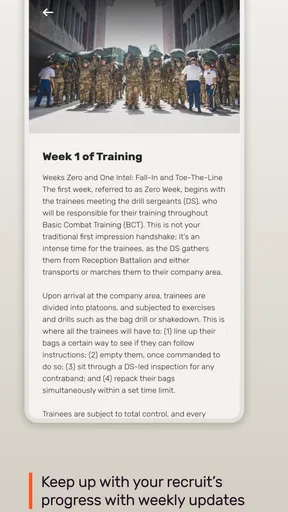
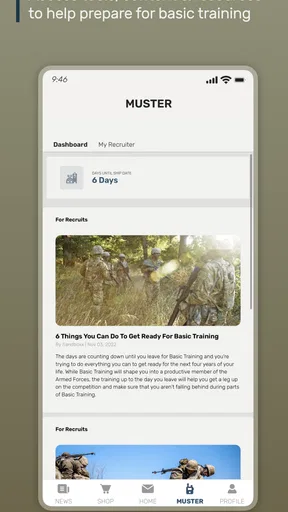
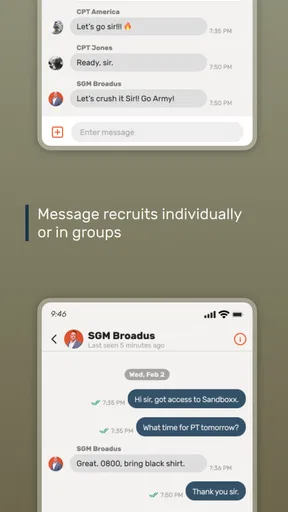
 Analysis by AppCompare
When someone in a household has a loved one in military service, keeping in touch can become a shared routine rather than a task for one person. I see the appeal of Sandboxx in that setting: it gives family and friends a way to prepare a physical letter from a phone, so sending a message does not depend on having paper, stamps, and a trip to the mailbox ready at the same time. It is a focused lifestyle app from Sandboxx, Inc., and its central idea is practical: turn a message written on a mobile device into mail for a service member.
A letter can be a shared household moment
A realistic use is a family writing to a recruit together. One person can gather the news everyone wants to share, while another helps choose a photo or checks that the message includes the small details that make it feel personal. The app suits that kind of occasion because the finished letter is physical, even though the writing begins on a phone. For a recruit away from home, a note about an ordinary dinner, a family joke, or a pet’s latest antics can feel more immediate than a quick digital exchange.
I would still treat the message as a personal letter, not as a group chat in disguise. A shared device can make drafting convenient, but the person whose account is in use should remain clear to everyone involved. Before sending, I’d read the whole letter together, confirm that the recipient is right, and make sure the photos and wording are ones the sender is comfortable sharing. Those small checks are especially useful when several relatives are contributing or when a child is helping an adult compose the message.
The service is most useful when the household values a mailed keepsake and wants to avoid the errands and preparation that can get in the way of sending one. If everyone simply wants an immediate back-and-forth conversation, a messaging app is the more natural tool. I think of this as a complement to digital contact: a deliberate letter for encouragement and family news, rather than a replacement for every other way of staying connected.
Connecting Made Easy
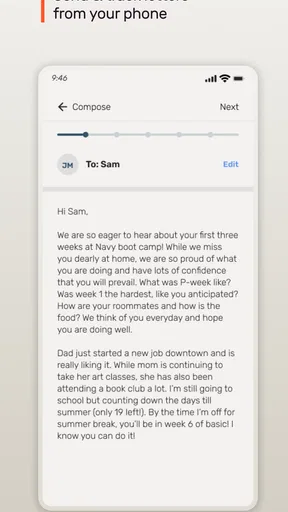
The coolest thing about Sandboxx is how it simplifies staying in touch with our friends and family in the military. We all know how tough it can be to keep that connection strong, especially when they're far away on duty. But with this app, sending a letter is as easy as pie. You just type it out on your phone, and Sandboxx takes care of the rest — printing, postage, and delivery. It’s like magic!
What I love about this feature is how personal it feels. Sure, we live in a digital age, but there’s something nostalgic and heartfelt about a physical letter. Plus, the app lets you add photos, making your message even more special. Just think about the smile on your loved one’s face when they receive it.
One useful habit is to draft the message when you have a quiet moment, then review it before sending rather than treating the first version as final. That pause helps catch an old address or a detail meant for a different recipient, and it gives family members a chance to add something meaningful without turning the letter into a long committee effort. If you are writing with children, I’d let them contribute a short paragraph or choose a suitable photo while an adult handles the final review.
Worth Reading Before You Choose

EA SPORTS FC Mobile 26 Is a Bigger Football Game, but It Takes Time

Flipboard Shows What News Apps Must Do Beyond the Feed

Switching to Android Auto Means Rethinking Your Driving Routine

Google Calendar Makes a Crowded Week Easier to Manage

Ludo King Makes the Most of the Minutes Between Plans

Baby Panda World Brings Quick Play to Modern Phones, but Its Game Library Feels Busy
It is also worth deciding what you want the letter to do. A quick note of encouragement can be brief; a longer family update can include a few concrete everyday details that make home feel present. Photos can add warmth, but I would choose them with the same care as the words: one relevant image may tell a clearer story than a collection that distracts from the message. The physical format is the point, so a little thought before tapping send is more valuable than trying to make every letter elaborate.
User-Friendly Design
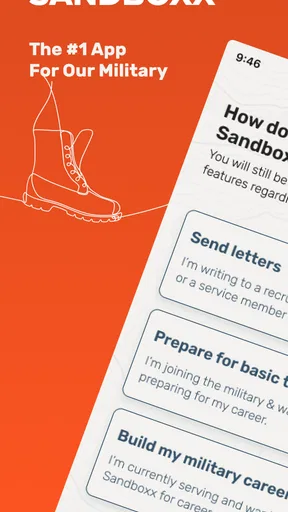
When it comes to apps, I’m big on design and usability. No one wants to struggle through a clunky interface, right? Thankfully, Sandboxx nails it with a clean and intuitive layout. From the moment you open the app, everything is straightforward. You’ve got your main options laid out clearly, and it’s pretty hard to get lost.
Even if you’re not the most tech-savvy person, you’ll find navigating through the app a breeze. It’s designed with the user in mind, which I genuinely appreciate. Plus, the process of sending letters is streamlined, so you spend less time fiddling with your phone and more time crafting your message.
For a household that shares a tablet or phone, “easy to use” does not mean everyone should share one login casually. I’d have the account holder start the process and keep track of what has been sent, while other family members contribute text or photos with that person’s help. This avoids the common confusion of someone assuming a draft was sent when it was only prepared, or another relative making a change without the sender noticing.
If you are helping an older relative who is uncomfortable typing on a phone, the streamlined letter workflow can make the task feel manageable, but it is still sensible to sit beside them the first time. Let them choose the message and recipient, and help only with the parts they ask you to handle. That approach keeps the app useful without making the account feel like a household utility that anyone can operate without the owner’s knowledge.
Support and Community
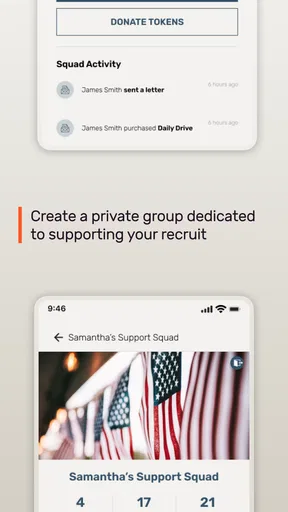
Another standout feature is the sense of community Sandboxx fosters. They’ve got a nifty feature that lets you connect with other families and friends of service members. It’s like a support network right at your fingertips. Whether you need advice, want to share experiences, or just need someone to chat with who gets it, this app has got you covered.
Moreover, the app provides tons of resources, from tips on sending mail to understanding military jargon. It's like having a mini-guidebook in your pocket. And let’s not forget their customer support — quick and helpful, which is always a plus in my book.
Community and reference material can be useful when a family is learning how to support someone in service, but I would use them as guidance rather than assume every family’s situation is identical. A term or custom may have a particular meaning in one context and not another, so it is sensible to ask the service member or a trusted family contact when a detail matters. The app’s letter-writing purpose remains its clearest everyday use; the community side is an extra for people who want connection beyond composing mail.
It may also help to agree on who will share updates with the wider household. If several relatives are receiving advice or exchanging experiences, one person can pass along useful points so the recruit does not receive repeated questions or conflicting messages. That is not a special app control; it is simply a considerate way to coordinate family communication around a service member who may have limited time to respond.
Keeping Security in Mind
Security is a big deal, especially when dealing with personal and sensitive information. I was curious about how Sandboxx handles this, and I’m happy to report they’ve got it locked down tight. Your data is secure, and the app takes privacy seriously, which definitely adds peace of mind.
They’ve implemented encryption and other security measures to ensure that your communications remain private and protected. It's reassuring to know they've put thought into keeping our information safe.
For shared-device use, my practical advice is to keep the boundary clear even when everyone trusts one another. Use the account holder’s own device access where possible, avoid leaving a personal session open for the next person, and do not include details in a letter that the sender would not want printed and delivered. A mailed message is intended to reach its recipient, so thoughtful wording matters just as much as privacy while composing it.
Families should also consider the age and role of anyone helping. The app’s content rating is Everyone, but that does not mean a child needs to manage an adult’s account or make decisions about what gets sent. A younger family member can help write a greeting or pick a family photo with a parent or guardian, while an adult checks the recipient and approves the final letter. That division keeps the activity warm and collaborative without blurring responsibility.
Choosing it for the right kind of contact
Compared with ordinary messaging apps, this service is built around sending a printed letter rather than instant replies. Compared with writing a letter by hand, it shifts the composing step onto a phone and handles the printing and postage process. That trade-off is appealing if getting to a mailbox is inconvenient or if several relatives want to help prepare a note. It is less compelling when speed is the priority, when the recipient is not someone the service is intended for, or when you simply prefer handwriting and mailing a letter yourself.
I would also be realistic about what a mailed letter can and cannot do. It creates a tangible message, but it is not a live conversation, and the recipient’s circumstances determine when they can read and answer it. For an urgent change of plans or a question that needs a quick response, use an appropriate direct communication method instead. For encouragement, family news, and a photo that can be kept, the slower format is part of the value.
The app is free to install, has an Everyone age rating, and has been available since June 8, 2015. It has a 4.1 average from around 21,000 ratings, with over one million installs. Its current version is 20.36.5, and it requires Android 8.0 or later. Those details make it easy to judge whether it fits your device and whether you are comfortable trying it; the key decision is still whether you want this particular letter-sending workflow.
In a busy household, I’d use it for a planned note rather than wait for a perfect occasion: a short message after a recruit’s first week away, a family update before a holiday, or a photo that adds context to a story. To keep coordination simple, decide who is writing, who is checking the recipient, and who presses send. That modest routine prevents duplicated letters and makes the finished message feel like a thoughtful contribution rather than another family task.
All in all, Sandboxx is an app that genuinely makes life a bit easier for those with loved ones in the military. It’s user-friendly, secure, and fosters a supportive community. Whether you’re sending letters, sharing photos, or connecting with fellow military families, this app has you covered. So, if you're in the market for a simple and effective way to stay in touch with service members, give Sandboxx a try. You might just love it as much as I do!
My household verdict
I’d recommend it to someone who wants an easier route from writing on a phone to sending a physical letter, especially when relatives want to contribute to messages for a recruit or service member. It is a more purposeful choice than a chat app, and a more convenient one than arranging every part of a letter by hand. The strongest reason to use it is not that it replaces other contact, but that it makes a personal mailed message simpler to send.
I would skip it if you need instant conversation, if you do not want to use a phone-based service to prepare mail, or if handwriting and posting letters yourself is already easy and enjoyable for you. For everyone else, I’d keep the account owner in control, review each message before it goes out, and use it for the sort of family news that deserves more than a hurried text. That balance makes the app feel useful without asking it to do a job it was not built for.
Pros
- User-friendly interface
- easy navigation.
- Secure messaging for military families.
- Quick delivery of physical letters.
- Real-time tracking for peace of mind.
- Supports various military branches.
Cons
- Limited to military-related use.
- Occasional app performance issues.
- Some features require payment.
- Limited customization options.
- No offline mode available.
FAQs for Sandboxx
What is Sandboxx and what does it offer?
Sandboxx is a mobile application designed to support military members and their families. It provides a platform for sending letters, accessing travel information, and connecting with fellow service members. With features like mailing services and military news updates, Sandboxx aims to streamline communication and keep users informed about military life.
How does Sandboxx’s letter service work?
Sandboxx offers a convenient letter-writing service that allows users to send physical letters to military personnel. Once you write your letter in the app, Sandboxx prints and mails it for you, ensuring it reaches your intended recipient quickly. This service is particularly useful for staying in touch with loved ones during basic training or deployments.
Is Sandboxx free to use, or does it require a subscription?
Sandboxx is free to download and use, but it does offer in-app purchases. While many features are complimentary, services like letter mailing may incur additional costs. Users can choose to purchase credits or subscriptions for premium features, making it flexible depending on your needs and frequency of use.
Can I use Sandboxx to book travel for military leave?
Yes, Sandboxx includes a travel feature specifically designed for military members. It helps users book flights, compare prices, and find the best deals for military leave. This feature aims to simplify travel planning and provide cost-effective options tailored to the unique schedules and requirements of military personnel.
Is Sandboxx secure and private?
Sandboxx prioritizes user privacy and security, employing encryption and secure servers to protect personal information. The app is designed to comply with military standards for data protection, ensuring that your communications and personal details are handled safely. Users can trust Sandboxx for secure transactions and private correspondence.


